Forest Wedding Wreath Clipart: A Watercolor Design Essential
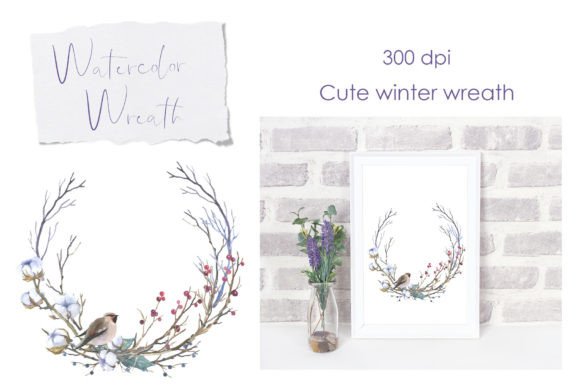
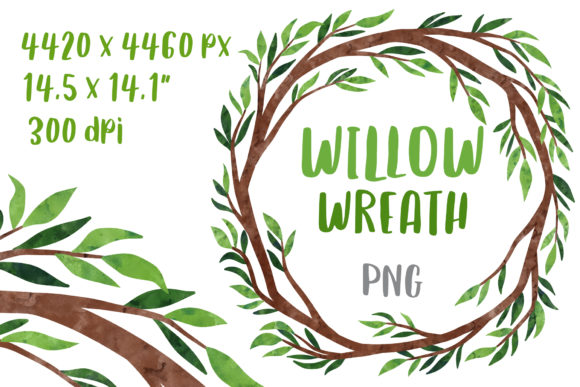
There’s something timeless about a wreath—it evokes a sense of welcome, celebration, and natural elegance. For designers and creatives, finding a wreath illustration that feels both organic and polished can transform a project from ordinary to unforgettable. The Forest Wedding Wreath Clipart Frame offers just that: a delicate, watercolor willow twig wreath that balances rustic charm with artistic sophistication. Its large size and high-resolution quality make it a versatile asset for anyone looking to add a touch of nature-inspired beauty to their work.
Why This Wreath Stands Out in a Sea of Design Assets
What makes this particular clipart frame so appealing? It starts with the artistry. The watercolor technique gives each twig and leaf a soft, hand-painted feel that digital-only graphics often lack. The willow branches are rendered with subtle gradients and natural imperfections, creating a sense of authenticity that resonates in designs aiming for an organic or bohemian aesthetic. The transparent background is a practical bonus, allowing seamless integration into any color scheme or layout without awkward edges or masking struggles.
At 4420 x 4460 pixels and 300 dpi, this illustration isn’t just pretty—it’s professional. Whether you’re designing for print or digital, the high resolution ensures crisp results even when scaled. The RGB color mode keeps it vibrant on screens, while its size makes it suitable for large-format projects like wall art or fabric prints. It’s the kind of asset that feels premium without the premium price tag, offering flexibility for both commercial and personal use.
From Wedding Invitations to Brand Identities: Real-World Applications
Imagine you’re a small business owner creating packaging for artisanal candles or handmade soaps. This wreath clipart could frame your product name on labels, instantly conveying a natural, handcrafted quality. Or perhaps you’re a blogger designing a media kit—using the wreath as a border around your stats or testimonials adds a touch of elegance that makes your materials more memorable. The versatility here is key; it’s not limited to weddings, though it certainly shines there.
For wedding stationers, this clipart is a dream. It can encircle monograms on invitations, accent save-the-date cards, or decorate menu layouts. But its utility extends far beyond nuptials. Social media managers could use it to frame quotes or announcements, giving Instagram posts or Pinterest graphics a cohesive, stylish look. Graphic designers might incorporate it into logo concepts for brands in wellness, floristry, or eco-friendly products, where a natural aesthetic aligns with brand values. Even educators or workshop creators could use it to beautify presentation slides or printable worksheets.
Enhancing Visual Consistency and Brand Recognition
One of the biggest challenges in branding is maintaining a consistent visual language across multiple touchpoints. A well-chosen design element like this wreath clipart can become a signature part of your brand’s identity. When used repeatedly across business cards, website headers, email newsletters, and social media profiles, it creates a recognizable motif that audiences begin to associate with your brand. This subtle repetition builds familiarity and trust—key components of effective brand recognition.
Consider a boutique hotel or a countryside retreat using this wreath in their collateral. The same illustration could appear on their website’s homepage, their booking confirmation emails, their room key cards, and their thank-you notes. This consistency doesn’t just look professional; it tells a cohesive story about the brand’s attention to detail and aesthetic sensibility. In a crowded market, these visual cues help you stand out and be remembered.
Practical Tips for Integrating the Wreath into Your Projects
When working with any clipart, especially one with as much detail as this, a few best practices can make your workflow smoother and your results more polished. First, consider the scale. Because this file is large, you can resize it down significantly without losing quality, but always check how it looks at the intended output size. A wreath that looks perfect on a business card might need adjustments when used on a poster.
Color coordination is another important aspect. The watercolor style typically features soft greens and browns, but you can adjust the hue or saturation in your design software to match your project’s palette. Try layering the wreath over a contrasting background to make it pop, or use it as a subtle frame by reducing its opacity. For text-heavy designs, ensure the wreath doesn’t compete with readability—sometimes placing it as a corner accent or a border works better than centering it behind a headline.
Don’t be afraid to experiment with partial uses. You might only need the top half of the wreath for a header design, or you could mirror it to create symmetrical borders. The transparent background makes these manipulations easy. If you’re using the wreath in a logo or brand mark, consider how it will look in black and white or when simplified for small sizes like favicons or stamps.
Aligning Design Choices with Project Goals
Every design project has a purpose, and your visual elements should support that purpose. A wreath like this one communicates growth, celebration, and natural beauty—ideal for projects related to events, lifestyle, wellness, or artisanal goods. If you’re designing for a tech startup, it might not align with your brand’s futuristic aesthetic. But for a gardening blog, a wedding planner, or a organic skincare line, it could be the perfect fit.
Think about your audience’s expectations. A wreath clipart appeals to those who appreciate craftsmanship and nature, so pairing it with a clean, modern sans-serif font can create an interesting contrast—traditional meets contemporary. Alternatively, combining it with a handwritten script font enhances the personal, artisanal feel. Testing different font pairings and layout arrangements is crucial; what looks good in your mind might need tweaking in practice. Always view your designs at various sizes and on different devices to ensure everything remains legible and balanced.
Ultimately, the Forest Wedding Wreath Clipart Frame is more than just a decorative element. It’s a tool for storytelling, a means to elevate your projects, and a way to connect with your audience through thoughtful, beautiful design. Whether you’re a seasoned designer or a passionate hobbyist, having such a versatile asset in your toolkit opens up countless creative possibilities. So go ahead—experiment, iterate, and let this wreath help you craft designs that feel both professional and deeply personal.